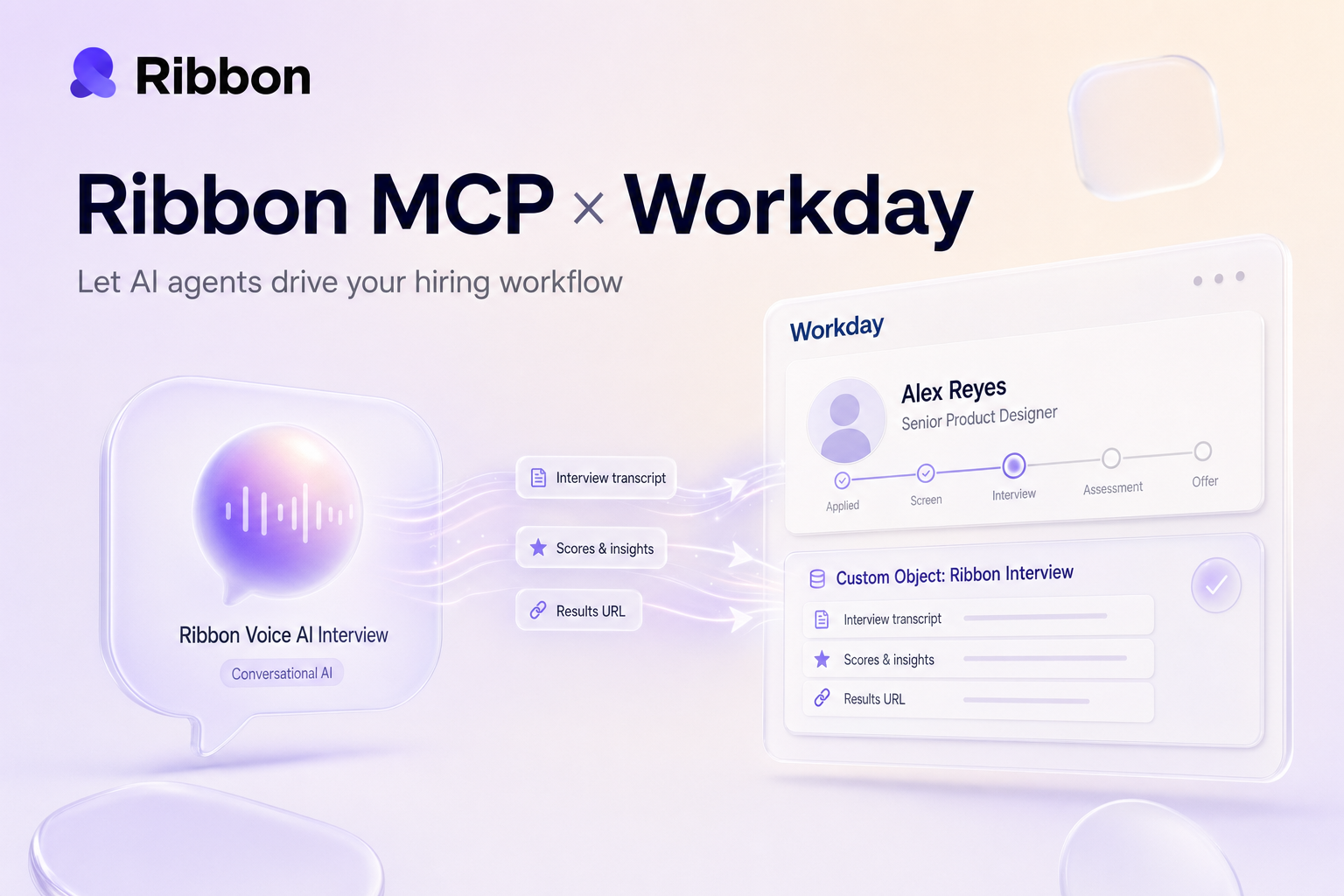
Ribbon MCP gives AI agents like Claude and ChatGPT live, structured access to your Workday Recruiting data without any custom integration work. They can read jobs, pipelines, and candidates in a single call, then write interview scores and transcripts back to Workday as a native custom object so recruiters never have to leave the ATS.
Lorem ipsum dolor sit amet, consectetur adipiscing elit, sed do eiusmod tempor incididunt ut labore et dolore magna aliqua. Ut enim ad minim veniam, quis nostrud exercitation ullamco laboris nisi ut aliquip ex ea commodo consequat. Duis aute irure dolor in reprehenderit in voluptate velit esse cillum dolore eu fugiat nulla pariatur.
Block quote
Ordered list
Unordered list
Bold text
Emphasis
Superscript
Subscript
If your team runs hiring in Workday and you have started building AI agents to help with recruiting work, you have probably hit the same wall everyone hits: getting the agent to actually do anything inside your ATS is painful. The agent can summarize a candidate, draft a scorecard, or write a clever rejection note, but the moment you want it to read live application data or push a result back into Workday, you are gluing things together with REST tokens, custom Studio integrations, and a lot of Python.
Ribbon MCP is the shortcut. It is a Model Context Protocol server that exposes your Workday Recruiting data to any AI agent that speaks MCP, including Claude, ChatGPT, and Cursor. Plug it in once, and your agent can list open jobs, pull live application pipelines, and write structured interview results back into a native Workday custom object without any of the usual Workday integration grind.
MCP is the open standard, originally introduced by Anthropic in late 2024, that lets AI agents talk to outside systems through a single, well-typed interface. Think of it as USB for LLMs. Instead of every team building bespoke tools for every model and every API, an MCP server publishes a list of tools, and any MCP-aware agent can discover and call them.
For ATS work, that distinction matters more than it does for most categories. Workday's API surface is famously deep. Job applications, candidates, requisitions, business process steps, and custom objects all live in different shapes, and they reward developers who already speak Workday's vocabulary. Asking an AI agent to learn that vocabulary on the fly almost never goes well. With MCP, the agent does not need to know Workday at all. It just calls list_applications.
Six read tools today. All scoped to your organization, all read-only by default:
The read-only default is deliberate. An exploratory agent should not be able to archive a requisition or move a candidate to "Hired" by accident. Writes happen through a separate, audited path, which we will get to in a second.
When the agent calls list_applications, Ribbon authenticates against your Workday tenant on your behalf, issues a paginated request against the Recruiting REST API, and hands the agent back a clean JSON payload it can parse without having to understand Workday's tenant URLs, object hierarchy, or REST shape.
That hand-off is doing more work than it sounds like. Workday's API uses cursor-based pagination, has rate limits that vary by tenant, and exposes some objects only through specific Recruiting REST endpoints (others live in passthrough territory). Ribbon handles all of that, including the retry-with-backoff logic for the inevitable 429s, so your agent's prompt does not have to.
One thing worth calling out for the IT and security folks: Ribbon talks to Workday over REST, not SOAP. If you have ever maintained a SOAP-based Workday integration, you already know why that matters.
Read tools are the easy half. The interesting half is what happens after a candidate finishes a Ribbon interview.
When an interview wraps, Ribbon creates a custom object inside your Workday tenant called ribbonInterview and attaches it to the corresponding job application. The custom object carries the structured outputs of the interview:
jobApplicationId: links the result back to the Workday applicationribbonInterviewScore: numeric score from the structured rubricdateCompleted: when the candidate actually finishedribbonInterviewSummary: a 255-character summary of the callribbonResultUrl: a deep link to the full transcript and recording inside RibbonribbonInterviewTemplate: which interview template was usedThat object lives natively in Workday. Recruiters see it on the candidate's profile, can filter on it, and can build BIRT reports off it the same way they would for any other Workday data. There is no second tab to check, no separate dashboard, and no "let me pull that up in our other tool" moment during a debrief.
If you also want the Ribbon invitation link to live inside Workday so a recruiter can send an interview without leaving the ATS, the same custom object holds a ribbonInvitationLink field that Ribbon writes before the candidate ever starts.
Workday's stage transitions are not as simple as "move this candidate to round two." Each step in your recruitment business process has its own ID, and you have to call the correct one for the move to land. For organizations that ask Ribbon to manage their stages, the configuration looks like a small map: an interview-sent trigger goes to one Workflow_Step_ID, an interview-completed trigger goes to another, and so on. Ribbon stores the mapping per tenant and applies it automatically when an event fires.
That detail is dry, but it is exactly the kind of thing that makes or breaks a Workday integration. Most off-the-shelf ATS tools punt on it. Ribbon does not.
Imagine you are a recruiter at a mid-market company, and you want your AI agent to do this every morning:
With Ribbon MCP, that whole loop is one prompt. The agent uses list_applications to get phone-screen candidates, kicks off interviews through Ribbon's normal API, and the next morning reads the completed scores out of the ribbonInterview custom object in Workday. The stage transition uses the workflow step IDs Ribbon already knows about, and the recruiter wakes up to a clean shortlist.
I have watched recruiters who used to spend two hours a day on manual screening get those hours back, and I have also watched the cynical ones turn into believers when they see the Ribbon Interview object show up natively in their Workday view, no toggling required.
Setup is genuinely quick if your Workday tenant is already healthy:
ribbonInterview custom object.mcp.json. For Cursor and ChatGPT, similarly small.From the time the credentials clear to the first agent call, most tenants are live in under a day.
No. Ribbon's existing Workday integration is what powers the MCP server. If you are already a Ribbon customer using Workday, MCP is a switch you flip in the dashboard, not a new project.
Ribbon uses the Workday Recruiting REST APIs, with passthrough access to specific REST endpoints for custom objects and stage transitions. SOAP is not in the path.
Yes, when paired with Ribbon's write actions and your tenant's mapped workflow step IDs. By default MCP itself is read-only, and writes happen through a separate, audited path. We made that choice deliberately so an experimental agent cannot move 200 candidates to "Rejected" because of one bad prompt.
Each completed interview creates a ribbonInterview custom object linked to the job application. It carries the score, summary, completion date, template used, and a link to the full transcript. Recruiters can see and report on it like any other Workday data.
Today, Ribbon MCP is scoped to Workday Recruiting. We are watching demand for HCM-side use cases like onboarding handoffs, but the v1 surface is intentionally narrow.
The MCP server runs in Ribbon's infrastructure with the same security posture as the rest of our platform. Tool calls are scoped to your organization, your Workday data does not leak across tenants, and you can revoke access at any time from the Ribbon dashboard.
The current six tools are deliberately the ones an agent needs to be useful on day one. The next wave will add richer write actions with explicit confirmation flows, search across Workday custom objects, and tighter coupling with calendar and Slack so an agent can run an entire scheduling loop end to end. We are also building the same MCP shape for Greenhouse, Lever, Ashby, and SmartRecruiters, so your prompts do not need to change when you swap ATS.
If you are running Workday Recruiting and you want your AI agents to actually move hiring forward instead of just generating prose about it, this is what unlocks that. Talk to us and we will get you set up.
Natural-sounding AI interviews that candidates actually enjoy
Instant feedback and scoring for every candidate
24/7 availability. Never lose a candidate to scheduling delays

"Ribbon AI reduced our time-to-hire by 60% while improving candidate experience."
- Sarah M., Head of Talent
See why teams are switching to smarter hiring.
7-day free trial • Cancel anytime


